
DocuSlide
Turns a PDF, a set of notes or a plain prompt into a teachable slide deck. The interesting part is what happens when every model endpoint is down — it still produces a deck, and tells you it did.
An AI search tool that finds a file by what is inside it — a phrase you remember from a slide, or what a picture shows — and never points at something that does not exist.


1 / 6
Regular file search only looks at file names. It never looks at what is actually inside a file. So if you remember a phrase from a slide but not which deck it was in, or you remember what a picture showed but not what it was called, you are stuck — you either ask a colleague who might remember, or you rebuild the thing from scratch.
That gap is small, constant and expensive. It is also completely solvable with retrieval, without needing a model to write anything.
I did not use a generative model. The job is to find a file that exists, not to produce prose about it. A generative layer would have added latency, cost and — critically — the possibility of confidently describing a file that is not there.
Every result the tool returns points at a real file on disk. That constraint made the product easier to trust and much easier to test, which matters more for a search tool than any amount of conversational polish.
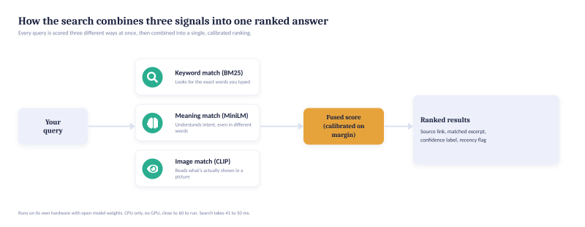
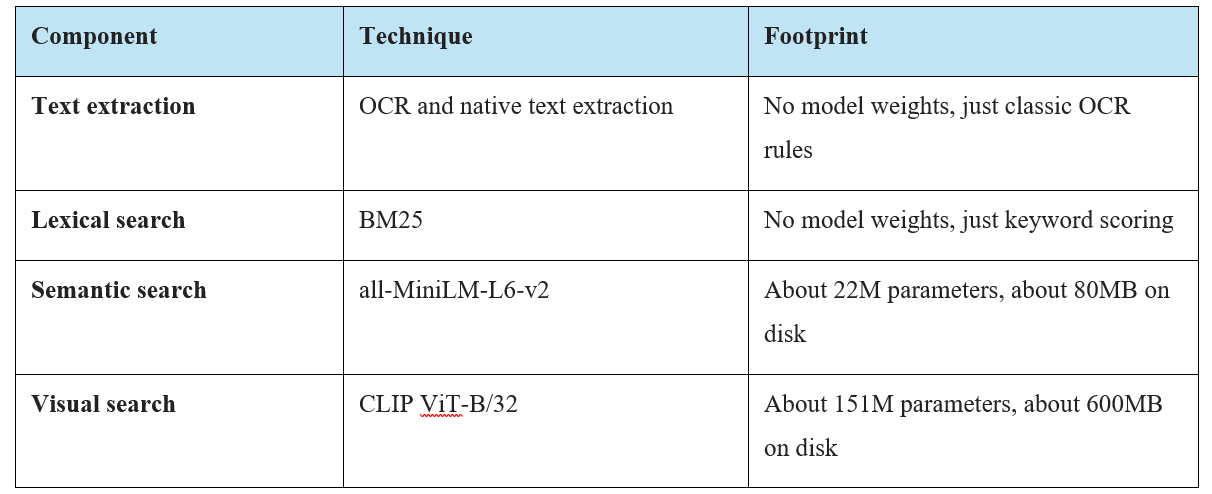
Search runs 3 matchers over every file and fuses their scores:
| Component | Technique | Footprint |
|---|---|---|
| Text extraction | OCR plus native text extraction | No model weights |
| Lexical search | BM25 | No model weights, keyword scoring only |
| Semantic search | all-MiniLM-L6-v2 | ~22M parameters, ~80MB on disk |
| Visual search | CLIP ViT-B/32 | ~151M parameters, ~600MB on disk |
Keeping the models this small is deliberate: the whole thing runs on ordinary hardware at a fixed cost, rather than billing per question.
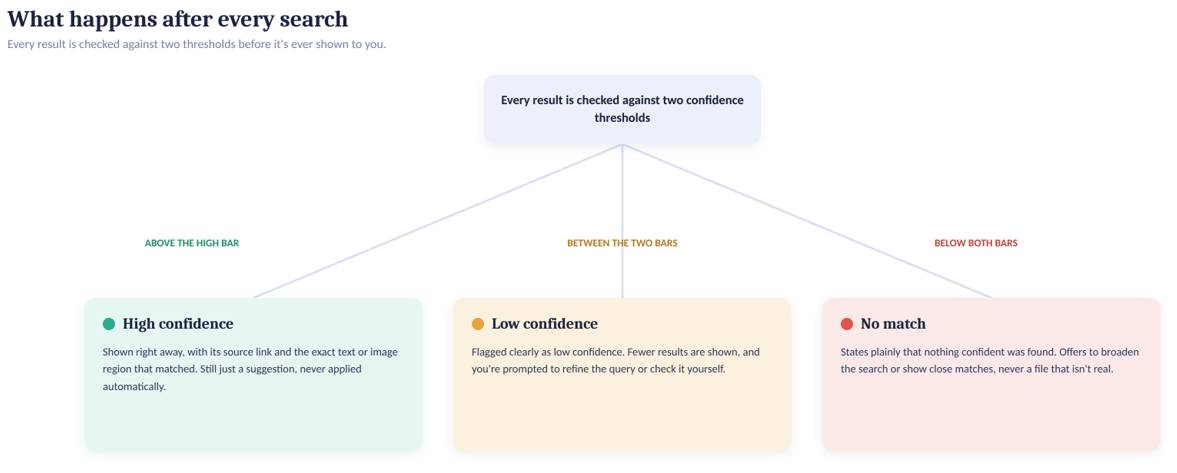
Every result is then checked against confidence thresholds, and the outcome is one of 3 states the user can see: high confidence (shown and ranked), low confidence (shown, flagged, with a suggestion to refine), or no match (says so plainly, rather than returning the least-bad file).
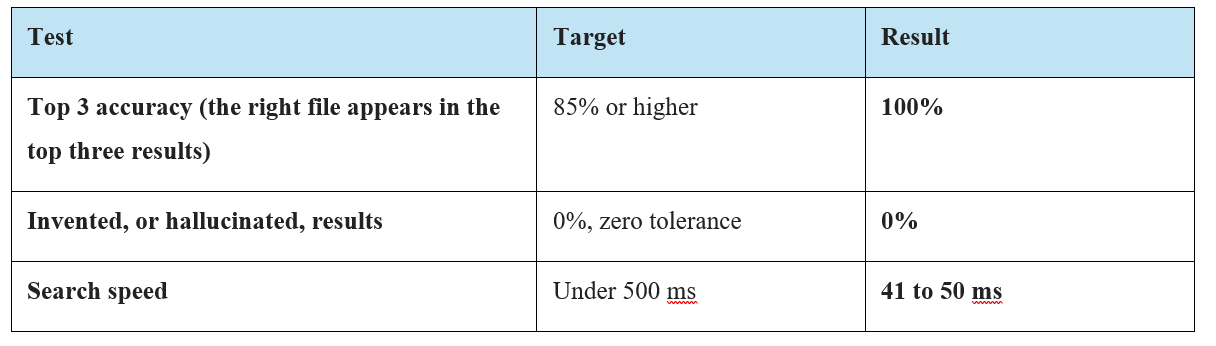
I built a test set of real searches before release — the kind where you only half-remember the thing you are looking for, because that is the actual use case. Testing search by trying a few queries you already know the answer to tells you nothing; it confirms the happy path and hides everything else.
This is the same argument I make in Evals Are the New Unit Tests, and building this tool is where it stopped being theory for me.
| Test | Target | Result |
|---|---|---|
| Top-3 accuracy — the right file in the top 3 results | 85% or higher | 100% |
| Invented or hallucinated results | 0%, zero tolerance | 0% |
| Search speed | under 500ms | 41–50ms |
The zero-tolerance line on invented results is the one that constrained the architecture. It is only achievable because there is no generative model in the path — there is nothing in the system capable of inventing a file.
Not every AI product needs a generative model. Retrieval solved the whole problem. Reaching for generation first would have made the tool slower, more expensive and less trustworthy, in exchange for nothing the user asked for.
“What does it do when it is unsure?” is a product question. It is the question that decides whether people keep using a search tool after the first time it gets something wrong.
Grounding is a feature you can sell. “Every result is a real file” is a promise a user can verify in one click, and it is worth more than a more capable system they have to double-check.
Full write-up on Medium: Asset Assistant: Building an AI Search Tool That Finds Files Even When You Cannot Remember Their Name.
Keep looking
Turns a PDF, a set of notes or a plain prompt into a teachable slide deck. The interesting part is what happens when every model endpoint is down — it still produces a deck, and tells you it did.