The problem
Remote teams generate hours of transcript across Zoom, Meet, Teams and Otter.
The text is high entropy and low signal: filler, small talk, tangents, speaker
crosstalk, and — buried somewhere in it — the 3 decisions that actually
matter and the 2 commitments nobody wrote down.
A project manager then spends 20 to 45 minutes after every meeting pulling
out action items, working out who actually owns each one, and writing the
stakeholder email. Every week, for every meeting.
What it produces
2 outputs from a single paste:
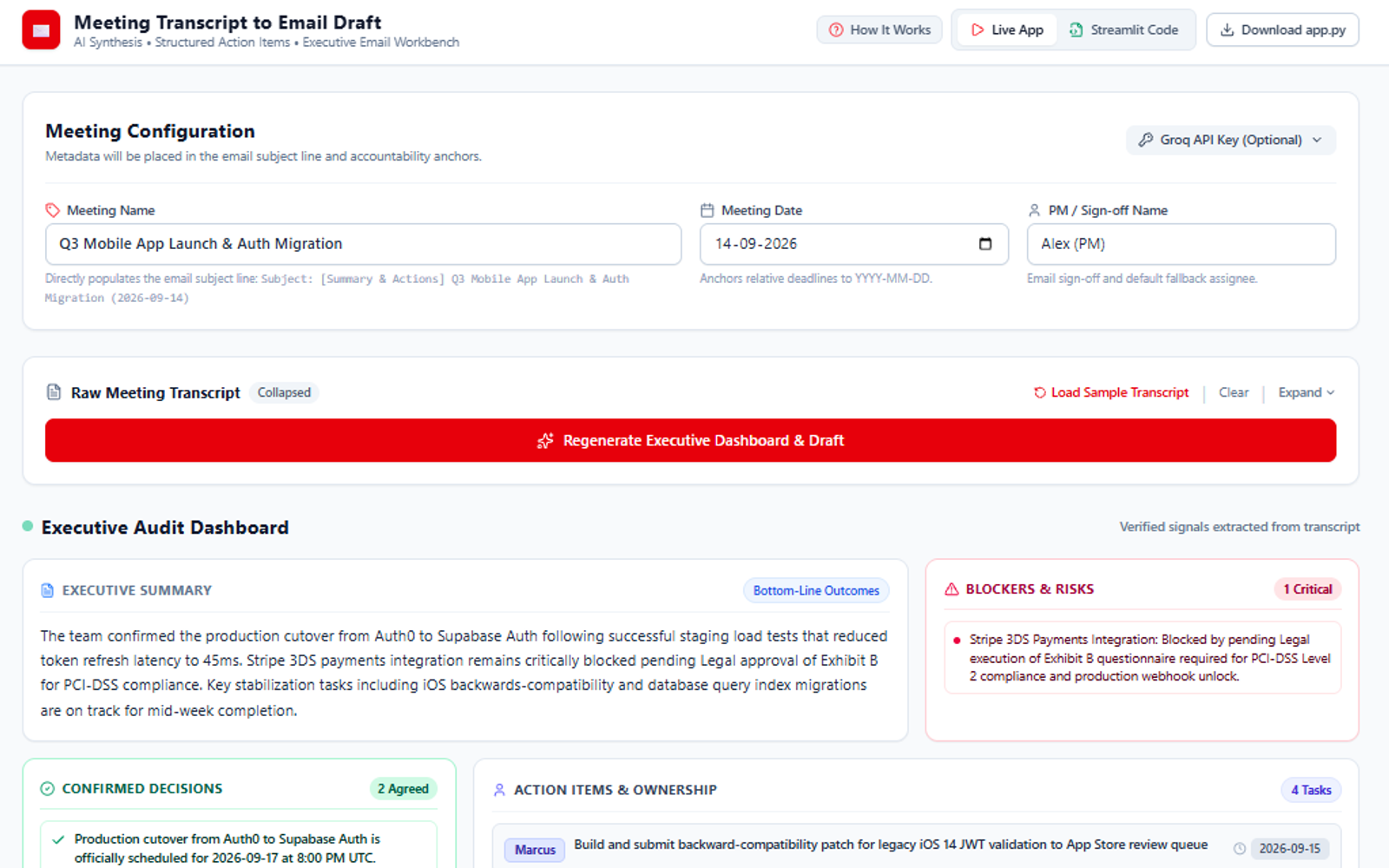
A visual audit dashboard — quantified blockers, confirmed decisions,
explicit action items with assignees and deadlines, and a separate bucket for
tentative items that need clarification. That last category is the one I
care most about. A transcript contains plenty of “I could probably look at that
this week”, and the difference between a commitment and a maybe is exactly what
a PM is paid to notice.
Tentative items carry a stated reason for being flagged — “exploratory
cost-saving idea; uncommitted pending preliminary pricing” — rather than just
a label. Without the reason, the reader has to re-litigate the judgement, which
costs more time than it saves.
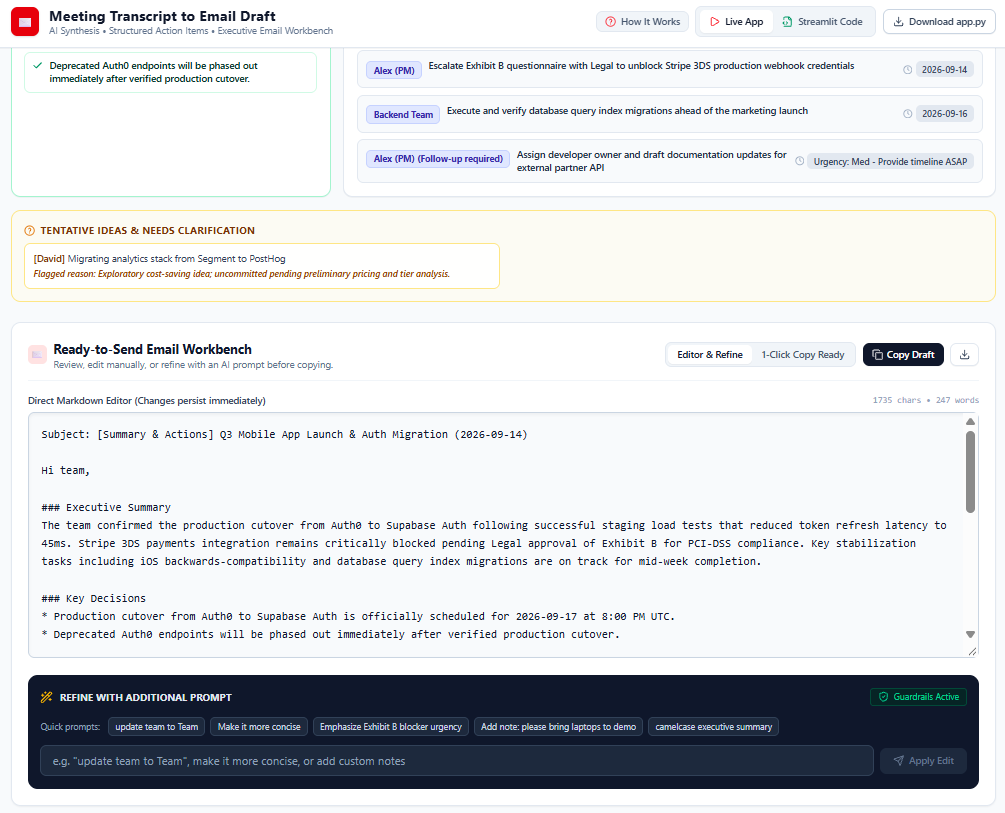
An executive email draft in clean markdown, editable inline, refinable in
natural language (“make it shorter”, “lead with the blocker”), and one click to
the clipboard.
It ships as a React SPA and as a standalone Python Streamlit script, so it can
live either as a web tool or as an internal data-science utility without
maintaining 2 behaviours.
Guardrails, because the output goes to leadership
This is a system that drafts a message sent to executives under a human’s name.
The failure modes are not “the summary is a bit vague” — they are attributing a
commitment to someone who never made one, or drafting something defamatory
about a colleague who spoke badly in a meeting.
Controls run client-side before anything reaches a model, and again in the
system instructions:
- Length limits (2,000 characters per refinement instruction)
- Anti-harassment and toxicity screening, so the tool cannot be used to
draft an attack on a named participant
- Prompt injection and jailbreak checks on user refinement instructions
- A corporate-fraud block — no fabricated business commitments, falsified
regulatory statements or invented compliance audits
- Injection resistance in the instructions themselves: if a refinement tries
to override prior instructions, the injection is ignored and the summary stays
faithful to the transcript
The model is also constrained against revealing its own system instructions.
2 inference paths
Users can supply their own Groq API key for a direct client-to-API call, or use
a server-managed proxy. Both use strict JSON schema mode. Offering both matters
for adoption: a data team will happily bring its own key, and a PM will not.
What I learned
“Tentative” is a first-class category. The first version sorted everything
into decision, blocker or action. Real transcripts do not divide that cleanly,
and forcing a maybe into “action item with owner” produces a confident email
that is wrong about what someone agreed to.
Guardrails belong where the output goes, not where the input comes from.
The anti-harassment and anti-fabrication rules exist because the artefact is an
email from a person to their leadership. Same model, different stakes, different
controls.
Draft, never send. Everything is editable and nothing is transmitted. The
tool removes the blank page, which is the expensive part; the judgement about
what leadership should read stays with the human whose name is on it.